Getting started
These guidelines are meant for any ESCWA staff involved in the creation of digital products. You are welcome to suggest an edit, an elaboration or further information.
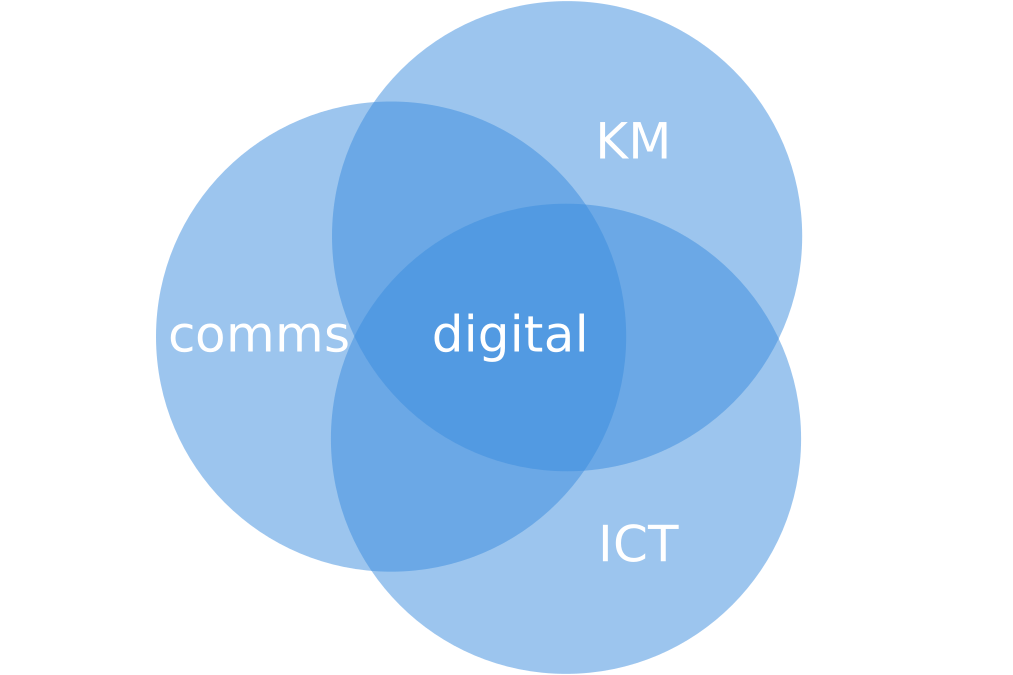
Knowledge Management + Communications + ICT = Digital
Digital is a domain shared by Knowledge Management, Communications and ICT. For our purposes, digital at ESCWA includes the corporate website and social media accounts that are managed and monitored by the Communications (Comms) team in collaboration with the Information and Technology Division (ICT), and with content editing and translation by the Content Management division. It also includes several portals, platforms and tools as requested by various teams across the organization.
All ESCWA digital products should involve Content Management, Comms and ICT from the beginning of conceptualization.
A website alone is never the answer.
To be effective, a website or other digital product must be integrated into a communication strategy in order to reach and engage a particular audience. A digital initiative needs to be promoted to, and respond to the needs of, a community. This is not limited to social media, and could include a variety of outreach tactics. A digital product without a thoughtfully developed and detailed outreach plan will not succeed.
Similarly, a coordinated, staged development and maintenance plan beyond the launch, also gives your product and community a chance to grow in harmony.
Writing for the web
Online content is different from printed publications. It needs to be ‘chunked’ into sections, with subheadings, or even multiple linked pages, and each chunk needs to make sense on its own.
Online readers tend to jump and read things out of order or context, then focus on content that interests them. They are not willing to read long passages or click many links to grasp the point. The online message needs to be crisp and easily understood.
An online text should have about half as many words as the print version of the same text, since users will not read too much text on screen.
Digital properties and accounts need to be well managed, and solidly governed.
Because certain types of digital products can be created and launched relatively easily and hurriedly, often without time for significant input from or collaboration with the two largest digital stakeholders—Comms and ICT―some digital products can be launched without a strategic goal, an timed outreach plan, and without any performance indicators being recorded. This non-strategic process can result in an inefficient deployment of resources and sub-standard results, and should be avoided.
If digital products are left in an ambiguous management state, untethered to any active strategy or communications goal, they can reflect poorly on ESCWA.
It is therefore important to consider the entire lifecycle of a digital product, and to have a continuous plan for as long as the product is active. If a digital product has reached the end of its usefulness, and has an audience of near zero, retiring said product is recommended.
ITC currently manages hundreds of active portals in various states of quality. An audit and assessment of relevance of these properties are recommended.
Project Timeline
An example for simple projects.
The following has been condensed to show minimum timelines for simple projects. It would need to be expanded over months for more complex projects requiring longer content gathering, design, build, and testing periods.
| Weeks before launch | Key activity | Digital Working Group | Project client |
|---|---|---|---|
| 6 | Situation, communication goals and draft concept proposed to Digital Working Group | Problem explored and defined. User goals detailed. Feasibility study. Team assembled. Major project functionalities and required technical solutions identified. Project timeline with key dates and milestone deliverables. |
Submit digital project form. Submit content outline. Submit 3 month outreach plan with targeted audiences. |
| 5 | Concept revised and solution detailed. (Begins with an MVP and iteratively grows from there based on user-feedback). | Site map and other rough mock-ups/prototypes delivered and approved. Design and build begins. | Proposed solution approved. Draft text/content in English or Arabic submitted. |
| 4 | Design and build | Development continues. | Final text in English or Arabic submitted. Translation begins. |
| 3 | Design and build | Development continues. | All text, images, graphics and features should final at this point. |
| 2 | Soft launch | Build finishes. Additional testing server issues, on-device testing, social media integration/sharing testing, etc. | Work with social media team to finalize assets and messaging. Work with media team to finalize press release, etc. 3+ month outreach plan final. |
| 1 | Public launch | Unlock site if previously locked. | Coordinated promotional events. |
| 0 | Analysis and auditing | Monitor site analytics and seek out user feedback. | Begin process again from start for the next iteration. |
Project Checklist
Here is a checklist you should consider before approaching the Digital Working Group with your project.
- Have you approached the ESCWA Digital Working Group 1-3 months before launch? Note that Comms, Content Management and ICT must be involved from the conceptual problem-definition stage.
- ESCWA ICT has over 200 active portals. Could your project be an update to an existing initiative? Will your project be replacing one them? If you currently have an active portal, what are the visitor numbers like? What lessons were learned from that project?
- What are your key dates? Will you be able to devote time and resources to content gathering in a timely manner and avoid a last-minute rush?
- Who are the target audiences for this product? (Listed by priority. Be as specific as possible. Region, language, age, online habits, etc.) What precisely should they be able to do? What key messages should they take away?
- What outreach activities are you planning to promote this product? (Social media plan, press release, etc.) Not just for the launch, but over the next three months.
- What are your key performance indicators? (desired monthly unique visitors, social media mentions, press coverage, etc?)
- Will you be able to provide a content outline 3-4 weeks before launch to allow for strategic feedback?
- Will you be able to coordinate draft content 2-3 weeks before launch to allow for any possible custom development?
- Will you be able to sign-off on final content 1-2 weeks before launch to allow for proper editing, testing, social media integration and asset creation, translation, etc?
- What is the estimated lifespan of this product? Three months? Six months? One year? (Maximum 3 years.) How do keep dates and events tie into this lifespan?
- After launch, what are your weekly plans for this product (promotion and updates) over the next three months?
- After launch, what are your monthly plans for this product (promotion and updates) over the next 6-12 months?
Design fundamentals
Visual Hierarchy
Visual hierarchy is the principle of arranging elements to show their order of importance, a structure so users can understand information easily. By laying out elements logically and strategically, designers influence users’ perceptions and guide them to desired actions.
If you have a hard time figuring out where to look on a page, it’s more than likely that its layout is missing a clear visual hierarchy. A common mistake for non-designers is to think that everything can be emphasized at once– which is not possible. If everything is emphasized, nothing is.
Building Blocks of Visual Hierarchy
Hierarchy is a visual design principle which designers use to show the importance of each page/screen’s contents by manipulating these characteristics:
- Size – Users notice larger elements more easily.
- Colour – Bright colours attract more attention than muted ones, so use them to attract attention.
- Contrast – Dramatically contrasted colours/tones are more eye-catching, and can be used for emphasis. More subtly contrasting colours/tones should generally be the default choice, when extra emphasis is not desired.
- Alignment – Out-of-alignment elements stand out over aligned ones.
- Repetition – Repeating styles can suggest content is related.
- Proximity – Closely placed elements seem related.
- Whitespace – More space around elements draws the eye towards them. Crisp, clean, minimalist designs calm users and create a sense of elegance, thoughtfulness, order and authority.
Layout
A corporate site layout should generally follow the familiar pattern of header, body and footer areas. The header should introduce the concept or idea of the webpage in a focused, undistracted way. Ease the user into the idea by providing them with information bit-by-bit. Avoid bombarding them with everything all at once. It's worth repeating: if everything is equally important, nothing is. Try to craft a linear narrative for the user.
Note that digital products that serve as 'dashboards,' (like the Data Portal) usually have more compact layouts. However, the rules of visual hierarchy and coherence should still be considered.
Typography
Corporate sites generally use a limited number of typeface families, with a variety of weights and sizes used to separate headlines from sub-headlines, body text and captions. In English, ESCWA should use just one. In Arabic, two: one for headlines and one for body text.
Align text left (English) or right (Arabic). In English, avoid justifying text as this creates awkward tracking issues and diminishes readability. Aligned center text should only be used for 1-3 lines of text, not for an extended paragraph.
Interactivity
Corporate sites should generally avoid overly distracting or complex transitions and animations. Interactivity should be constant, standardized into a repeatable motion language and expected by the user. Animations that distort type tend to look unprofessional.
Logo
UNESCWA's logo includes an emblem, a tagline and a decorative interpretation of the SDG wheel, forming a barbell shape. This version is preferred, though there will be occasions when just the emblem should be used. For example, if the SDG logo appears as a distinct interactive element, if the space is limited (such as a video screen 'bug') or if the size is so small that the tagline is unreadable.
The exploding SDG wheel element will fade into the background in certain implementations, such as on a UN blue background. Note that this is acceptable since the it is a decorative element, and that the SDG wheel elements should not be given a key-line stroke.
Tagline version
The tagline version of the ESCWA mark, with a decorative interpretation of the SDG wheel, is the preferred implementation. It should be used when space allows.
English


Arabic


Emblem version
While the tagline version should be used by default, the emblem version of the ESCWA mark should be used when space is limited, when the size id so small that the tagline becomes unreadable, and when the SDG logo also appears as a distinct interactive element.
English


Arabic


Colour System
The colour system recommended here will serve to unify ESCWA digital products. White should dominate most layouts. Lightness is preferable to darkness, generally speaking.
Primary Palette
Midnight should be used instead of black. Most layouts will start with a white background and midnight for text, then cloud when a background or large block contrast is needed with white.
Start with a simple, minimal colour selection, with subtle contrast, and then add bolder choices and contrasts to emphasize certain elements and serve the visual hierarchy. Brighter colours can then be introduced when a pop is required.

Midnight
RGB: 024 024 040
HEX: #181828

White
RGB: 255 255 255
HEX: #FFFFFF

UN blue
RGB: 058 141 222
HEX: #3A8DDE

Mulberry
RGB: 035 035 058
HEX: #23233A

Plum
RGB: 050 050 093
HEX: #32325D

Cloud
RGB: 240 242 249
HEX: #f0f2f9

Foggy
RGB: 185 195 207
HEX: #B9C3CF

Smoke
RGB: 136 152 170
HEX: #8898AA
Secondary Palette
The secondary colours listed below should be used sparingly, and usually one at a time, to add a bit of flavour and emphasis. Avoid using them in combination for the most part. They individually work well with the primary palette, with the exception of the UN blue, which should be used mainly for branding.

Bluebell
103 114 229
#6772e5

Sunshine
245 190 88
#f5be58

Violet
146 081 172
#9251ac

Leaf
006 178 125
#06b27d

Peach
225 162 123
#ffa27b

Oxblood
158 033 070
#9e2146
SDG colours
If the digital product addresses one or more of the SDGs, it may be appropriate to use SDG colour(s) and icon(s). In these cases, you should not use them in combination with the secondary palette colours as detailed above. Choose one or the other.
Graphics
Some general observations:
- Avoid visual clichés like puzzle pieces, clip-art and photo-montages.
- Avoid pixelated graphics.
- Use a consistent graphic language.
- Start with white, and add colours gradually and with intention.
- Build a system and apply it consistently. Only break it thoughtfully, and with intention.
Our graphic language




Try to use strong contrasts in tone or colour between elements to add emphasis and draw attention, not as your default choice.
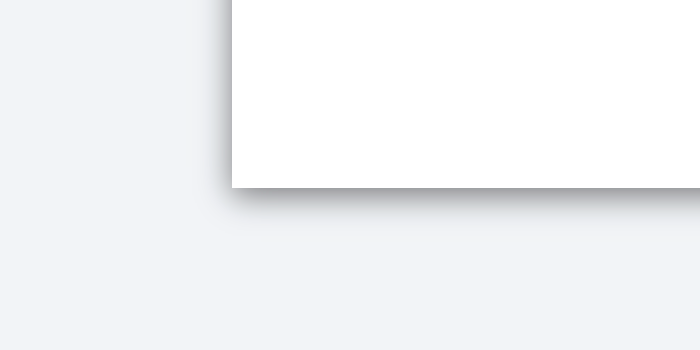
Use box shadows sparingly and subtly. Slightly increasing their strength on hover is a good way to indicate an element is interactive. Avoid strong box shadows.

Avoid boxes with rounded corners.
Icons
Use SVG icons whenever possible. Consider simplifying designs by using monotone or duotone icons to start and adding colour only when necessary, to indicate an active state or for emphasis.
Typography
Typefaces express history, values and other cultural associations. Organizations usually have a corporate typeface that serves to establish a consistent visual brand. However, there may be situations, such as sub-brands or social media campaigns, when alternate more expressive typefaces are used.
There are essentially three ways a website can load a typeface:
- Load a webfont from a licensed foundry like Adobe. This allows for a more custom solution. An Adobe account connects to the Abobe Font server to deliver the font files.
- Load a webfont from a popular open-source foundry like Googlefonts. This allows a less distinct solution. A google account is not required.
- Load a system font from the user's local computer. This solution is a fallback, and allows the web designer little control.
Latin alphabet/English
Optimal
Soleil
Soleil is a sans-serif typeface with a subtle yet distinctive personality that separates it from more common open-source alternatives. A contemporary geometric with plenty of optical adjusts, its traits include a large x-height for legibility and screen readability even at small sizes.
Soleil is available in seven weights: Light, Regular, Book, Semibold, Bold, Extrabold and Black, and corresponding italics. Generally, only two of these weights (600 and 400) should be used on unescwa.org to minimise load time.
Font files for the typeface are available through Adobe Fonts, so ESCWA already has access through our Adobe Creative Suite subscriptions without additional licensing being needed.
Text styles in Soleil
Display 1
Display 2
Display 3
Display 4
h1. Soleil heading
h2. Soleil heading
h3. Soleil heading
h4. Soleil heading
h5. Soleil heading
h6. Soleil heading
Vivamus sagittis lacus vel augue laoreet rutrum faucibus dolor auctor. Duis mollis, est non commodo luctus.
Lorem ipsum dolor sit amet, consectetur adipiscing elit, sed do eiusmod tempor incididunt ut labore et dolore magna aliqua. Ut enim ad minim veniam, quis nostrud exercitation ullamco laboris nisi ut aliquip ex ea commodo consequat. Duis aute irure dolor in reprehenderit in voluptate velit esse cillum dolore eu fugiat nulla pariatur.
Alternative
Source Sans
There may be situations when Soleil is unavailable, so here is a recommended, more-accessible alternative. Source Sans was commissioned by Adobe to be its first open source typeface family, but it is currently easiest to load it through Google Fonts. It is a sans serif typeface intended to work well on screens and in user interfaces.
Text styles in Source Sans
Display 1
Display 2
Display 3
Display 4
h1. Source Sans heading
h2. Source Sans heading
h3. Source Sans heading
h4. Source Sans heading
h5. Source Sans heading
h6. Source Sans heading
Vivamus sagittis lacus vel augue laoreet rutrum faucibus dolor auctor. Duis mollis, est non commodo luctus.
Lorem ipsum dolor sit amet, consectetur adipiscing elit, sed do eiusmod tempor incididunt ut labore et dolore magna aliqua. Ut enim ad minim veniam, quis nostrud exercitation ullamco laboris nisi ut aliquip ex ea commodo consequat. Duis aute irure dolor in reprehenderit in voluptate velit esse cillum dolore eu fugiat nulla pariatur.
Arabic
For Arabic, ESCWA is pairing to distinct typeface families: A geometric one for display and headlines, and a more script-like, readable one for body text.
Optimal
Display: Almari
Almarai is a contemporary, geometric Arabic typeface family available in 4 weights, designed for screen readability. Almari is available through Google Fonts.
Body: Adobe Arabic
Adobe Arabic is available in two weights and italics. Adobe Arabic is available through Adobe Fonts.
Text styles in Almari and Adobe Arabic
مؤازرة لبنان في إعادة البناء
مؤازرة لبنان في إعادة البناء
مؤازرة لبنان في إعادة البناء
مؤازرة لبنان في إعادة البناء
h1. مؤازرة لبنان في إعادة البناء
h2. مؤازرة لبنان في إعادة البناء
h3. مؤازرة لبنان في إعادة البناء
h4. مؤازرة لبنان في إعادة البناء
h5. مؤازرة لبنان في إعادة البناء
h6. مؤازرة لبنان في إعادة البناء
هدفنا الرئيسي هو تمكين المواطنين، على صعيد فردي، من بناء سبل رزق مجدية في اقتصاد سوق فعال.
وسيستفيد المركز من الإمكانات التي يتيحها التواصل الرقمي لربط رواد الأعمال بخبراء من الشبكة العالمية للأمم المتحدة وغرفة التجارة الدولية وتزويدهم إلكترونياً بالتوجيهات والإرشادات اللازمة. ويعتمد المركز أيضاً على الإمكانات المتوفرة لدى غرف التجارة في أكثر من 100 بلد، وإدارة حلول المعرفة في غرفة التجارة الدولية، ومراكز المعرفة في الإسكوا.
Alternative
There may be situations when Adobe Arabic is unavailable, so here is a recommended, more-accessible alternative. Noto Naskh Arabic is available through Google Fonts.
Text styles in Almari and Adobe Arabic
مؤازرة لبنان في إعادة البناء
مؤازرة لبنان في إعادة البناء
مؤازرة لبنان في إعادة البناء
مؤازرة لبنان في إعادة البناء
h1. مؤازرة لبنان في إعادة البناء
h2. مؤازرة لبنان في إعادة البناء
h3. مؤازرة لبنان في إعادة البناء
h4. مؤازرة لبنان في إعادة البناء
h5. مؤازرة لبنان في إعادة البناء
h6. مؤازرة لبنان في إعادة البناء
هدفنا الرئيسي هو تمكين المواطنين، على صعيد فردي، من بناء سبل رزق مجدية في اقتصاد سوق فعال.
وسيستفيد المركز من الإمكانات التي يتيحها التواصل الرقمي لربط رواد الأعمال بخبراء من الشبكة العالمية للأمم المتحدة وغرفة التجارة الدولية وتزويدهم إلكترونياً بالتوجيهات والإرشادات اللازمة. ويعتمد المركز أيضاً على الإمكانات المتوفرة لدى غرف التجارة في أكثر من 100 بلد، وإدارة حلول المعرفة في غرفة التجارة الدولية، ومراكز المعرفة في الإسكوا.
Photography
Photography should be dynamic and tell a story. Try to show active people and a diversity of ages, genders, professions, situation. Use natural light, well-lit and outdoor shots whenever possible. Avoid overusing posed, static, interior shots of meeting participants.
File management
ESCWA should establish a Flickr Pro account to manage photography across the organization, similar to ICT and UN Women Arab States. UNDP Arab States has a non-pro account.
Giving credit
Every photo should have a photo credit included in the following format: Photo: J.Smith/UN Women. It can be added as alt text to the img tag following a description of the photo, and in small text in the bottom right corner (or bottom left corner in Arabic) or at the end of a caption below the photo.
Photography sources
As a UN agency, we can look to other agencies in the UN family for photography. Agencies with large budgets for original photography include HQ/UN Photo, UN Women, Unicef and others.
Video
Scripts
Video scripts should be as short and concise as possible. Try to stay under 300 words.
Will notable exceptions, try to make most video durations 2mins or shorter. Attention spans for web videos tend to be short.
Recording
Test the audio before, and use a lapel mic with a wind sock to prevent noise. Some noise can also be filtered out in post through the 'denoise' features available in Adobe Premiere and Audition.
Postproduction
On-screen text should be extremely short. Viewers do not enjoy reading paragraphs of on-screen text.
On-screen text should follow the typographic suggestions in these guidelines.
Capitalize surnames/family names. Avoid displaying surnames in all-caps.
Subtiles/captions
Subtitles should always be added as an external, time-coded .SRT file. Avoid hard-coding subtitles. Note that also no ESCWA videos on Youtube currently include English/Arabic subtitles. These should be added.
Note that many ESCWA Youtube videos need .SRT subtitle files to be added. For example, this parrtnerships video should have Arabic subtitles.
Frontend Development
Fontend development for new subsites is now being shared through Github. Please create an profile and request to join if relevant.
If you're unsure of where to start, Bootstrap by Twitter is a solid way to deliver results quickly by using a popular framework that has been tested and integrated with a numerous contemporary features and elements. The starter pack includes HTML, CSS, and JS files. Currently version 4.5.
The new ESCWA site and other new subsites are being built on a common codebase based on a customized version of the Leap Bootstrap theme. The full files are available on Github.
CSS
The Bootstrap system
The bootstrap system is built upon a system of element classes, nested from containers to rows to columns, which can further divided into rows and columns.
Breakpoints and responsiveness
I prefer to remove the breakpoint max-width attributes for containers and to treat them all as fluid containers. One max-width should be given for extra larger screens, and the container padding should be set to get progressively narrower on smaller screens through breakpoints.
Flexbox
Bootstrap 4+ has flexbox baked into the system which allows for a much broader range of layout options as compared to earlier systems. Some additional code targeting IE 10/11 may likely be required, so be sure to test your layout on these older browsers, as they are still widely used across the UN system.
Javascript
Flickity
If your website has a slideshow, then Flickity should be strong contender to power it. It's responsive, includes support for touch, can be disabled at certain breakpoints, along with an API and a host of other useful features.
Bootstrap-select
If your website requires selectors, either single or multiple, then consider using Bootstrap-select. It's packed with useful features including select all, display selected, live search options and more.
Jquery filter
If your website requires a live search filter on lists outside of a dropdown button, a more simple jquery approach will do the job. An example for a table that can easily be ported to an unstyled list.
GoodShare
The GoodShare plug-in has little of the usual bloat that comes with social media sharing plugins and is ultra customizable. We'll likely be integrating this across our Drupal and ASP.NET sites.
More to come.
Resources
Pixel Perfect Precision Handbook
The digital design agency ustwo (who produced the iOS game Monument Valley) have created a Pixel Perfect Precision Handbook. It's loaded with useful tips ranging from interface design to file management and photoshop set-up. Worth taking a look at! PDF
StackOverflow
StackOverflow is a popular, open web developer platform for knowledge sharing. If you're encountering a coding issue, chances are someone has encountered it before and the answer is here.
CodePen
If you're interested in achieving a certain animation or layout using a particular javascript library or plug-in, or CSS technique, CodePen is an excellent resource. Be forewarned that not all examples are ready for deployment and that some contributors are better than others.
CSS Tricks
CSS Tricks is a dependable resource for all issues and techniques related to CSS, including layouts, animations, browser-compatibility, etc.
Testing
Sticking to the suggested digital project management schedule will allow time for a digital project to be properly tested, ensuring a positive, professional impression is made on all users, regardless of how they choose to access your material.
Devices
Mobile device users now account for over half of all website traffic, so ensuring that all ESCWA websites are fully responsive is vital.
Contemporary browsers like Google Chrome have mobile device simulator tools built in, so that's a good place to start. Be sure to include the most popular iOS and Android devices.
Following this, websites should also be checked on the devices themselves, which will reveal a higher degree of detail and usability nuance (how certain swipe effects work, etc.). Note that device-specific bugs can often be dealt with with targeted CSS styles using pixel-density, etc.
Browsers
While Google Chrome has been the dominant browser for both Windows and MacOS users for some time now, it also important to test all ESCWA websites in other browsers including Firefox, Safari and MS Edge.
Keep in mind that many UN agencies still install legacy browsers as the default browser on UN laptops, so it's always a good idea to have look at your site on Internet Explorer 11 and 10, so at least the most egregious rendering errors can be addressed.
Accessibility
It is important to consider accessibility features of all ESCWA websites for disability inclusion.
Please consider using the WAVE Web Accessibility Evaluation Tool, for your analysis of key accessibility feature benchmarks. The UN also has a website on this.
Here is a selection of features that should be considered to enhance accessibility:
- Alt tag descriptions for all images.
- Reader view control
- Keyboard accessibility (Tabable content)
- Zoom to 200% without text loss
- Contrast mode
- Easy Read
- Sign language
- Subtitling
- Text to speech
- Listen option
- Wave test reports
Social Media Integration and SEO
How the page appears when shared
A significant majority of all web content is found through social media networks, so it's important to optimise website head metadata so that a graphic card, title, and description appear correctly when the url is shared on various networks, particularly Twitter, LinkedIn and Facebook.
Share buttons
Share and follow button groups should also be integrated where appropriate in the user journey – once the user has finished reading. Implement with consideration of a user's needs. Avoid the common mistake of making absolutely everything – including elements that no users would ever want to share – sharable.
Follow buttons
Links to ESCWA social media accounts should generally be placed at the end of a user's journey through the content, once they have finished reading. Encouraging users to leave a page they've just arrived on by placing follow buttons in the header, makes little strategic sense.
SEO
Website head metadata reflects how a website appears in popular search engine (Such as Google) results (when it does appear - not how prominently it appears in search results, which is the result of a more complex algorithm including how often the page is linked to and visited).